It’s now really easy to roam with your iPhone without getting a nasty phone bill when you return. Here is what you need to do in 3 steps all of which you can do from your phone. Note – the following instructions are for iPhones.
1. Turn off Mobile data usage when roaming – This allows you to avoid hefty roaming data charges or to be safe, you can even turn data completely off and just rely on Wifi. This can be done under Settings – Mobile

2, Block Inbound Calls – When you are Roaming, your provider may charge you for inbound calls so it’s best to turn them off. iPhone has made this really easy now by using the Do Not Disturb feature which is the Crescent Moon icon. Swipe down from the top right hand corner of your iPhone to open the Control centre and look for a crescent moon icon.
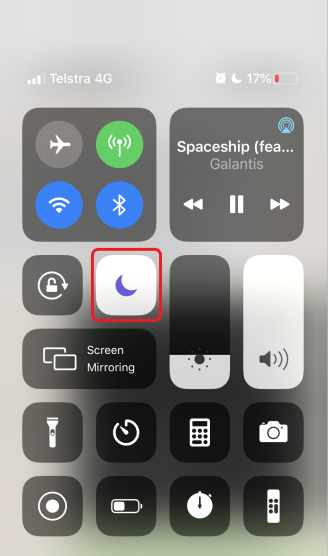
Note that Do Not Disturb by default allows phone calls from your Favourites so you can go to Settings if you wish to further customise how your Do Not Disturb should behave.
3. Make outbound calls – You may still want to be able to make outbound calls as your discretion while overseas. Unlike Inbound calls and Data usage, Outbound Calls are within your control so you can turn this on and use it if / when needed. To be able to do this, you just need to call your Mobile Network Provider check that international roaming is turned on. You will only need to do this once with your phone provider. Once Roaming is turned on at a Network level, it will remain turned on unless you call your provider to turn it off.


Thanks for this very good information.
Siva chithappa
>
LikeLiked by 1 person